Choose your TREX IPTV player
Trex Pro and Trex IBO have different starting screens. Identify the one on your device, then follow its account setup.

Read the player name exactly as it appears
Trex Pro, Trex IBO, Trex IBO Pro and Trex VIP have separate records. Their similar names are a frequent obstacle when someone needs to replace a working installation. Start with the name and version shown by the installed app, then compare the reference to the device and operating system where it will actually run.
Two Android packages were available for direct archive inspection. The directory also retains older names for desktop, Android and receiver software. A support-only record can establish a name and historical filename while leaving current distribution unresolved. Use the named guide to identify what is known before asking about a replacement.
Trex IBO
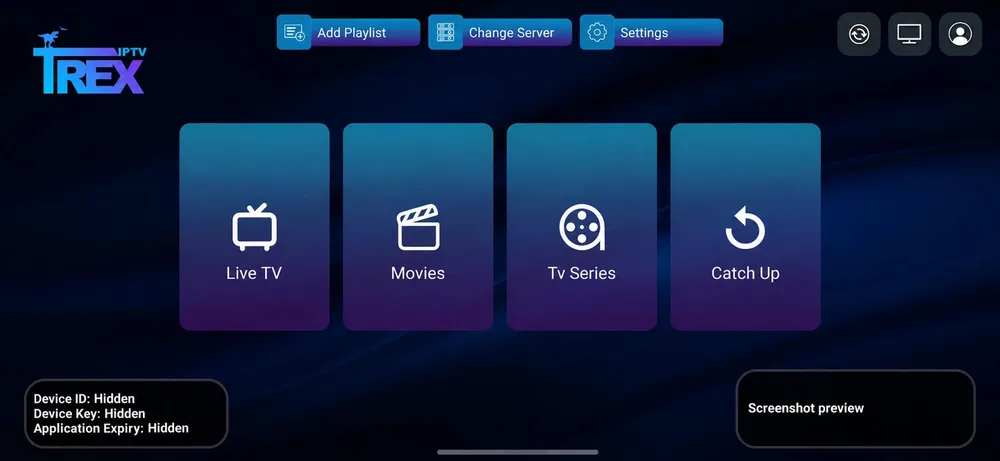
The supplied IBO photographs show two useful landmarks. One is a home menu with Live TV, Movies, TV Series and Catch Up. Another shows username and password fields. Device identifiers have been removed from the published images. If the home menu opens but one category is empty, try another category within the same activated account. Note whether the player reported a loading error, showed empty results or returned to the menu. Those outcomes give the provider different leads.
Identify Trex IBOTrex IBO Pro
The catalogue gives IBO Pro the separate filename X-IBO-PRO.apk. It also lists Trex IBO and Trex Pro as two other entries. Combining their names informally can send a user to either of the wrong players. The two documented numeric lookup codes on this site refer to IBO and Pro separately. Neither identifies IBO Pro. Someone asking about a familiar code should first establish which complete app title appeared in the original message.
Identify Trex IBO ProTrex Mobile OTT 7.1
The word Mobile in the source matters. This entry is filed for Android handsets, and 7.1 appears in its filename. That number supplies a useful search term for support. It does not establish a required Android release or a TV edition. For a problem seen after locking the phone, compare a short uninterrupted session with one that includes the lock screen. If only the second attempt fails, report the phone model and return-from-lock behaviour along with the app identity.
Identify Trex Mobile OTT 7.1Trex Windows App 1.2.0
Windows App 1.2.0 and Player for Windows 0.2.0 have distinct titles in the supplied directory. Both filenames end in .exe. That extension identifies a Windows executable but says nothing about its publisher, supported processor or upgrade relationship. If playback already works and the new file was suggested for an unrelated account issue, preserve the working app while the publisher explains the proposed change. Note whether the current problem happens at installation, launch, sign-in or after selecting a channel.
Identify Trex Windows App 1.2.0Trex Player for macOS 1.0.0
The archive describes a macOS Player disk image carrying 1.0.0 in its name. The use of Player distinguishes this record from the MacBook App 1.2.0. Both are desktop references, so neither filename is a package for Apple TV or iPad. If the app opens on the Mac but the television stays blank, keep the Mac test separate from AirPlay or the HDMI connection. Record whether the picture appeared in the local player window before moving on to display routing.
Identify Trex Player for macOS 1.0.0Enigma2 Application IPK
Enigma2 is a receiver environment. The catalogue calls this an IPK application, while the listed delivery file is a ZIP archive. Those facts describe the reference only. They do not identify a current plugin feed or a processor-compatible package for every receiver. Preserve existing tuner channels, recording timers and provider configuration when investigating an IPTV plugin. If satellite or terrestrial services already work, record whether the issue is limited to launching the plugin or happens only after selecting an internet service.
Identify Enigma2 Application IPKComplete player library
Choose the screen you recognize

What to tell support
A TV model identifies the hardware. The name at the top of the player identifies the software. Include both, along with the country of the app store, when asking which account setup to use.
TV stores
| Guide | When to use it |
|---|---|
| Find and reopen a player on a Samsung TV | A missing Home shortcut can look like a missing app. Search the TV’s Apps section, then check whether the listing offers Open or Install before starting again. |
| Check an LG player against the TV model and service country | LG lets you look up an app against a country and TV model. Use that lookup when a player appears on another LG screen but is missing from yours. |
| Why a Google TV in basic mode has no app installation | A television set up in Google’s basic mode can show its tuner and HDMI inputs while app installation remains unavailable. This setting applies to televisions with Google TV built in. |
| Check Google Play compatibility for a phone and a TV | A Google Play result on a phone can describe a player that its developer has not offered for Android TV. Look up the device-specific compatibility result before downloading. |
| Identify Fire OS or Vega OS before choosing a Fire TV player | Amazon uses the Fire TV name on different operating systems. Match the precise product generation against Amazon’s device table before asking for a player or Android package. |
| Which Apple TV screen can install a player? | The App Store on an Apple TV 4K or Apple TV HD can install tvOS apps. The Apple TV app on a television is a viewing app inside that television’s own system. |
Account formats
| Guide | When to use it |
|---|---|
| Open the correct kind of network address in VLC | VLC’s network-stream dialog expects a media or playlist address. A broadcaster homepage, a reseller login page and a private playlist are different destinations. |
| Choose the right MAG setup for a playlist or external portal | Infomir documents a playlist inside the embedded portal and an external operator portal as two different routes on its Linux and WebKit set-top boxes. Start with the account information you received. |
| Match a Formuler MYTVOnline account to the correct source | Formuler documents three input families for MYTVOnline. The account you were issued determines whether you need device-linked portal details, an XC login or an M3U playlist. |
| Match the TREX Android filename to the player you requested | The TREX reference directory lists separate Android package names and lookup numbers for Trex Pro and Trex IBO. A number can identify a distribution reference while your viewing account uses different credentials. |
Sharing a screen
| Guide | When to use it |
|---|---|
| Find the correct Google Cast receiver from your player | Casting from a supported mobile app uses the phone running the player and a receiver on the same Wi-Fi network. Test the phone first so you know where playback stopped. |
| Choose AirPlay video or screen mirroring on an iPhone | AirPlay can send a video from a supported app, or mirror the iPhone or iPad screen. Choose the path that matches what you want the television to show. |
Android installer reference
Find the installer for your player
Compare the published filename with the player support recommends for your device. Keep the store listing or confirmation available when you open the app.
Illustrated guides