
Which Apple TV screen can install a player?
The App Store on an Apple TV 4K or Apple TV HD can install tvOS apps. The Apple TV app on a television is a viewing app inside that television’s own system.
Identify the device that opens the store
Start at the Home screen of the box or television you intend to use. If a physical Apple TV is connected by HDMI, use its remote and look for App Store. If you launched the Apple TV app from a Samsung or LG launcher, leave that app and use the television manufacturer’s store to look for a compatible native player.
Apple TV of the third generation presents another case. Apple documents that model as having built-in apps and no App Store for adding new ones. A search inside the Apple TV viewing app will not add an IPTV player to that older box.
Read the action beside the player
On Apple TV HD or 4K, search the App Store for the publisher’s player. A price or Get starts the store transaction. Open means that the app is already installed. Get can still be followed by optional purchases inside the software, so read the licensing information before paying.
Launch the player and describe the first account screen to support. If the store supplied the app successfully and the app now asks for a service account, you have completed the installation stage. Keep the two purchases identifiable by recording the app publisher and the issuer of the viewing subscription separately.
One television can show two Apple identities
A smart TV may contain the Apple TV streaming app while an Apple TV 4K box is attached to another input. The content or logo seen on screen can look familiar on both. Only the box’s tvOS Home screen supplies its App Store. Switch to the input connected to the Apple box and use its remote. Open Settings, General and About if you need the model, then return to the grid of installed apps. Look for the Store there before searching for a viewing player.
If you were already watching inside the TV’s built-in Apple app, nothing is wrong with that app when the tvOS Store fails to appear. You were operating a different host. Recheck which hardware will open the third-party player. Apple TV HD and Apple TV 4K can install from the App Store; Apple’s older third-generation Apple TV has a different app model.
Put the result in context
For this Apple TV and tvOS question, start with the controls shown on your own device. Read the model number on the Apple TV box or its About screen. Apple lists A2843 as the third-generation 4K model with Wi-Fi and Ethernet; A2737 is the Wi-Fi model. The Apple TV app on a smart television can show similar branding without giving you a tvOS App Store. Which remote takes you to the grid that contains the App Store? Write down the answer alongside the player title. The on-device result distinguishes a local setup issue from something you have only seen in a product image or a guide for a different generation.
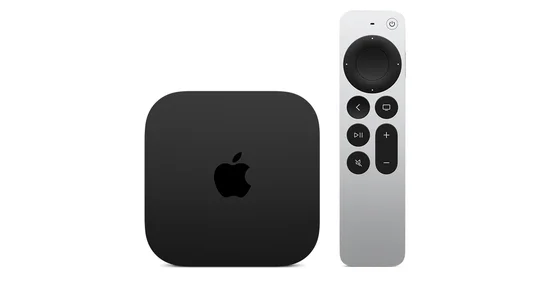
A hardware example is Apple TV 4K with Siri Remote. Apple lists two third-generation Apple TV 4K configurations, A2737 for Wi-Fi and A2843 for Wi-Fi with Ethernet. A replacement Siri Remote can be paired to another box, so the remote alone cannot settle which model is on the shelf. Check Settings, General and About against Apple’s model list. If the household expects a wired comparison, identify whether this model actually has an Ethernet port before changing the router or looking for an adapter. In the case described here, the most informative observation is what happens immediately after the action you are testing. Keep the same device and input while reproducing it, so the publisher can recognize which part of the sequence changed.
Preparing a reply the right person can use
Ask “Which remote takes you to the grid that contains the App Store?” and include the system release and country with the actual response. Test a tvOS installation independently of AirPlay from an iPhone. A local failure and a failed wireless transfer need different details. If a support agent asks you to describe the account screen, name its visible fields and the button you selected. Those labels communicate the workflow without disclosing the contents of a private account.
Before repeating the test, keep one point of comparison from Apple TV and tvOS. A television in the living room and another in a bedroom might both offer Apple TV+. Only a separate compatible box or another eligible Apple device can use the tvOS installation route described here. Compare the same action under the original conditions first. If a second screen behaves differently, identify that device separately, say what it showed and note whether it used the same account and distribution source.
Questions and answers
Can I install a tvOS player from the Apple TV app on a Samsung or LG television?
Use the television’s own app store for native TV apps. The tvOS App Store runs on an Apple TV HD or Apple TV 4K connected to the television.