Identify your device, operating system or remote
A product photo helps distinguish the hardware on your shelf from the platform running on it. Browse the category that matches what you can see.

How to read this visual index
Start with whichever detail you can identify from the sofa. It might be the maker on the bezel, a model number printed on a box or the mark beside the app store. Product photographs, platform marks and application symbols answer different questions. An exact model gives you a route to a specification. A logo gives you a name to investigate.
Photographs in these collections retain their original scope. Some identify a single model with a generation. Others show a family, a rear or front detail, or a promotional television in a room. Read the caption and use the linked maker or catalogue reference when a specific model or feature matters. A memory size, system release or store region cannot be read from a similar-looking remote.
An icon, a sending device and a receiver
AirPlay audio symbol, Google Cast, Apple Safari and the browser marks in this group represent different parts of a viewing setup. The first useful question is where the programme is actually playing. Someone can open a link on a phone, select a receiver across the room and then use a television remote, all in one session. Read the single AirPlay graphic here as an audio symbol. It does not identify the video route from an iPhone. An audio destination selected during playback can leave the picture on the phone. Record the control you pressed and whether sound, moving video or a copy of the whole phone screen appeared on the television.
Browse this groupChoose the screen that owns the installation
A large monitor can display the output of a Mac mini, a Windows laptop or an iPad. This gallery groups the named computers and handheld devices that can sit on either side of that display. The screen size in a photograph supplies little evidence about which store should provide the player. The two Fire HD 8 photographs are a useful starting point. Amazon uses the same twelfth-generation description for the 2022 and 2024 releases, and one model code appears across both. Pair the model information with the release designation and memory configuration before asking whether a particular app is intended for that tablet.
Browse this groupUse a maker’s mark to find a more precise label
Brands in this collection include manufacturers of televisions, phones, media boxes and receiver hardware. If someone tells you they watch on a Samsung, Apple or Xiaomi device, the word can refer to several entirely different products. Use the mark to prompt a second question about the model and the screen that opens the player. Formuler and Infomir illustrate the difference between a maker and an account method. A Formuler receiver can use MYTVOnline, whose source options depend on the app edition. An Infomir receiver can use its own embedded portal. A picture of either maker’s logo cannot identify which kind of viewing account the owner was issued.
Browse this groupRead the application name before selecting a source
The collection includes VLC, Kodi, MYTVOnline 3 and a Ministra Pro symbol. These names can appear in conversations about the same television while referring to different software. The clearest clue is the title of the application that asks for input. A middleware logo by itself cannot identify the receiver or the account details. MYTVOnline 3 is particularly useful to distinguish from the name on the receiver. Formuler’s documented source choices include a portal, XC and M3U. The menu entry you select should match the information actually supplied. A playlist link should reach a playlist control. A portal address belongs with the provider’s relevant registration instructions.
Browse this groupFind the operating system beneath the product name
The platform gallery includes Windows, Android, Android TV, Google TV, Apple’s separate operating systems and television-specific marks. The logos solve an identification problem, especially when a retailer’s listing says only smart TV. They do not establish the model year, current software version or presence of a specific player in the owner’s country. Android and Android TV appear separately for a reason. An application distributed for a touchscreen may never appear in a television’s Play catalogue. A Google TV owner can also encounter basic TV mode on a compatible built-in television. Identify the setup on the hardware itself before interpreting a blank search result.
Browse this groupDistinguish an exact TV model from a product-family picture
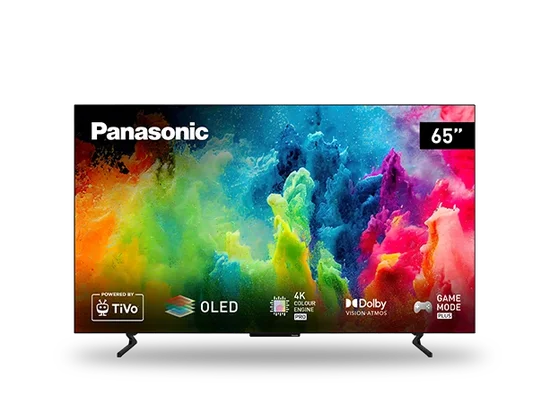
Four television images carry different levels of detail. The Sony reference names the BRAVIA 8 K-65XR80. The Panasonic and Philips images identify promotional OLED television material. The LG image shows an OLED set in a room. A named television model can lead to model-specific documentation. A family photograph still leaves the owner’s actual model unresolved. If a television was purchased abroad or passed between family members, record the full model code and the country where the owner is searching for the player. LG provides a model-and-country app lookup. An app visible on a relative’s television of the same size and brand may have a different local listing on the set at hand.
Browse this groupCompare the box and the generation on its label
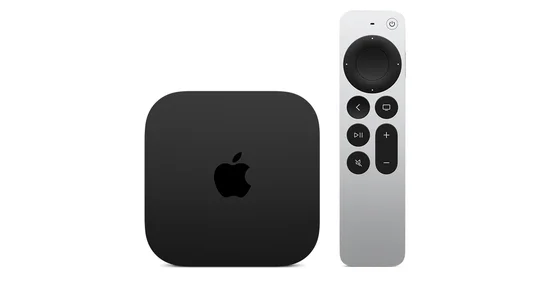
Fire TV generations, Apple TV, Xiaomi boxes and sticks, SHIELD models and Infomir receiver imagery appear together here because they all connect to a screen. Their software distribution and account models differ substantially. A small box on an HDMI shelf can host a television store, a provider portal or a maker-specific receiver environment. The Stick 4K Select and Stick 4K Plus both carry 2025 names. Amazon places Select in the Vega family and Plus in the Fire OS family. Their similar product descriptions lead to different app checks. Use the exact generation in an enquiry even when the two devices sit beside one another in the same household.
Browse this group