
Identify Fire OS or Vega OS before choosing a Fire TV player
Amazon uses the Fire TV name on different operating systems. Match the precise product generation against Amazon’s device table before asking for a player or Android package.
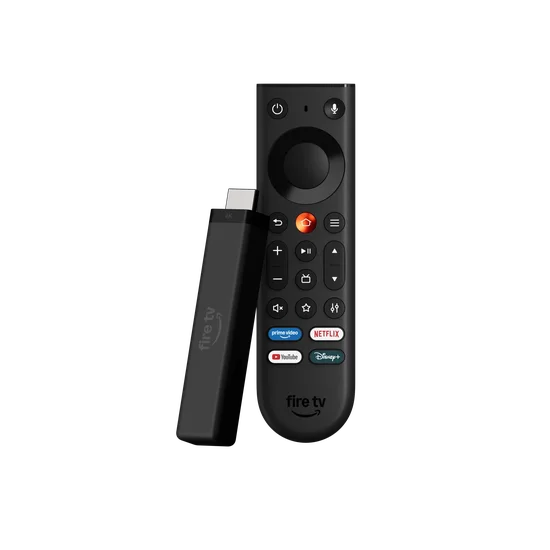
Two boxes with similar names can need different software
A listing that only says “Fire TV Stick 4K” leaves out the generation. Amazon’s table identifies its 2026 third-generation 4K stick as Vega OS. The table also records the 2026 Fire TV Stick HD under Vega OS. Rows for Fire OS devices instead list an Android level alongside the Fire OS release. Look for the complete model entry, including the generation printed on the packaging.
Examples from Amazon’s hardware table
| Product designation | Build model | Operating-system family |
|---|---|---|
| Fire TV Stick 4K, third generation (2026) | AFTCR001 | Vega OS |
| Fire TV Stick HD (2026) | AFTCL001 | Vega OS |
| Amazon Fire TV Omni QLED Series (2025) | AFTPOC9BD3 or AFTPO9D4D7 | Fire OS |
The model identifier is useful if your device information or manufacturer paperwork provides it. A screenshot of your Amazon account or its payment settings adds nothing to the model match.
Choose the distribution route
For a Vega device, look for the player in its own app catalogue or ask the publisher about a Vega release. For Fire OS, confirm the named player’s support for that exact model and generation. A published Downloader lookup number for an Android package does not answer either question.
Once the correct store build opens, read the first account screen and use that description in the trial request. That gives support the operating-system family and the kind of account the installed software expects.
A Plus and a Select in the same household
Fire TV Stick 4K Plus and Fire TV Stick 4K Select both appeared in 2025. The former is filed under Fire OS 8 and the latter under Vega OS. A recommendation based solely on the year and the words Fire TV 4K loses that distinction. Read the complete model name and compare it against Amazon’s table. If someone offers the TREX Pro Android package, verify which unit they mean. The archived Android version describes no Vega distribution.
An app can have a familiar name in two Amazon ecosystems while being released through different packages. The deciding evidence is the listing offered for the exact device and the publisher’s support for that target. On a new Vega stick, ask for a Vega-targeted listing before trying to follow an older Fire OS tutorial.
Put the result in context
For this Vega OS question, start with the controls shown on your own device. A Fire TV logo can identify hardware running Vega or the Android-based Fire OS. Amazon documents Vega as a separate target for player developers. The name printed after 4K or HD can therefore matter more than the resolution printed on the box. Does the label end in Plus, Select or Max, and what software does Amazon list beside its model? Write down the answer alongside the player title. The on-device result distinguishes a local setup issue from something you have only seen in a product image or a guide for a different generation.
A hardware example is Fire TV Stick 4K Select (2025). The Select and Plus from 2025 need different distribution checks. For Select, ask about the publisher’s Vega OS release. The manufacturer identifies the product by build AFTCA002 and lists Vega OS 2.0. These two details can settle a store question that the release year alone leaves open. Start in the store on the Select itself. Someone moving from a 4K Plus may recognize the Amazon menus while needing a different application release. The visible shape of the remote does little to settle this point. In the case described here, the most informative observation is what happens immediately after the action you are testing. Keep the same device and input while reproducing it, so the publisher can recognize which part of the sequence changed.
Preparing a reply the right person can use
Ask “Does the label end in Plus, Select or Max, and what software does Amazon list beside its model?” and include the system release and country with the actual response. Look for an explicitly targeted Vega build and have support match the account to its actual start screen. If a support agent asks you to describe the account screen, name its visible fields and the button you selected. Those labels communicate the workflow without disclosing the contents of a private account.
Before repeating the test, keep one point of comparison from Vega OS. Two relatives may describe their streaming devices as a “Fire TV 4K.” The relative with a Select can have a different software target from someone with a Plus. Ask each person to read the entire label. Compare the same action under the original conditions first. If a second screen behaves differently, identify that device separately, say what it showed and note whether it used the same account and distribution source.
Questions and answers
Does a 2026 Fire TV Stick 4K use the same app distribution as every earlier 4K stick?
Amazon identifies the third-generation 2026 Fire TV Stick 4K, build model AFTCR001, as a Vega OS device. Check the exact product generation and obtain a compatible player for that platform.