Apple MacBook Pro viewing setup
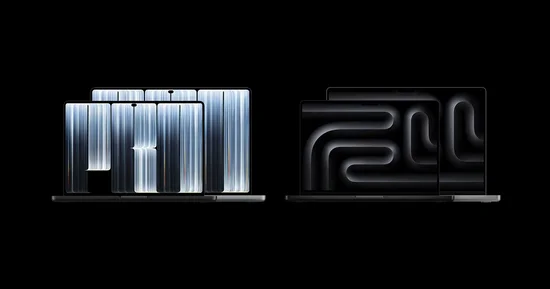
The photograph identifies Apple MacBook Pro. Match the full product name and the device that runs the app before choosing an installer.
Recognize the hardware
MacBook Pro covers many model years. A guide written for one connector layout or chip generation can be the wrong place to identify the edition of a player to install. The chip shown under About This Mac is more instructive than the choice of external television or monitor.
To check the player on Apple MacBook Pro, begin at Apple menu and About This Mac. Read the processor or chip and the currently installed macOS release. A visual family name such as Mac mini covers several generations. A publisher might offer separate Intel, Apple silicon or universal builds and list a minimum system version beside them. Record the installed version while the screen is in front of you. A shop description can name the product family without telling you what software this particular unit runs.
Which component changed when the laptop was docked?
Begin with normal laptop playback. Add the dock and check which monitor receives the picture. Open the selected audio output separately. A desk with headphones, a monitor and a receiver can give the impression of silent playback while sound is reaching another device. Test in a normal window on the display connected at the start. Check the selected audio output while it is playing, then try full screen or a second monitor as a separate step. The two tests can reveal different failure points.
On a docked setup, a working app can open behind another window or on a second display. Bring it to the front and read the filename or account prompt before diagnosing the service. Keep any account address outside a screenshot of the desktop. Keep the outcome with the device name, Apple MacBook Pro. If a message appears, write down its wording and the action immediately before it. Someone reading that description can repeat the same step without guessing whether the failure happened at the store, in the player or during playback.
Find the correct installation route
For Apple MacBook Pro, the first distribution check concerns the Mac App Store or the named desktop publisher. Use the player publisher’s own desktop distribution page, or its matching Mac App Store entry. VideoLAN offers different macOS downloads. Compare the selected build with About This Mac before opening it, and keep the downloaded file distinct from the application you launch afterwards. Before accepting a purchase, read the name of the organization charging for it. An application licence, an optional upgrade and a viewing account can have different issuers even when all three appear during one setup.
When Apple MacBook Pro reaches the account screen, record the labels before asking for a trial. A desktop player may open a compatible network playlist, while another player expects separate account fields. VLC’s network-open function needs the address supplied for that purpose. Keep long private playlist URLs out of screenshots, public tickets and screen shares. If the approved player opens with an existing profile, leave it available until you have identified the profile used for the test. A new installation can remove the most helpful point of comparison.
Compare the next device in the room
A useful comparison here is Apple MacBook Air. The MacBook Air supplies its own screen, keyboard and speakers. Its built-in display gives a useful point of comparison when a television is reached through an adapter or wireless receiver. Disconnect the optional viewing display for one test. Open the player on the laptop, read the station title and listen through the built-in speakers. When that works, attach the display or select the wireless receiver and try the very same station.
The observation to carry over from the comparison is specific to Apple MacBook Pro. Find a compatible desktop build, then verify the source and the Mac’s actual display and sound path independently. If the two devices behave differently, record the service you selected, the displayed local time and which player opened it. A new app, a new network and a new account in the same attempt leave several possible explanations.
When the first attempt stalls
An installation question about Apple MacBook Pro can begin with the last screen that worked. If the installer will not open, report the package name, macOS release and processor family. When the app opens but a playlist does not, describe what type of address it expects. Repeating an installation does little to test an already open player’s network input. Describe the change you made once, then try the same action again. Keep an existing working connection or account intact while checking the one that fails.
A concise message can include “Which component changed when the laptop was docked?” followed by the model, system version, player title and what you saw. Give the first result from the test above as well. Those details are enough to start a conversation without sending a password, a private playlist or a photograph of someone else’s account.
Identify the hardware
| Detail | What to match |
|---|---|
| Product pictured | Apple MacBook Pro |
| Device family | Mac |
| Other catalogue labels | Apple, MacBook Pro family; size/chip unspecified, MacBook Pro |
Choose the player
Check the macOS version and the publisher’s system requirements. Open the installed app and verify the supported account format before entering service details.
Open the Mac guideA second display can change which device you hear
When a MacBook Pro is attached to an external display, audio can still come through the notebook or another selected output. Play a familiar local sound first and identify where it emerges. Then test the programme without changing the output. That provides a meaningful baseline if one particular audio language or channel appears silent.
For an installation recommendation, retain the exact chip and macOS version the laptop reports. A MacBook Pro family name appears across Intel and Apple silicon configurations. A file another Pro owner successfully opened may come from a different build or year. Ask which publisher edition belongs on this particular system before drawing conclusions about the account.
Questions and answers
Which component changed when the laptop was docked? (Apple MacBook Pro)
Begin with normal laptop playback. Add the dock and check which monitor receives the picture. Open the selected audio output separately. A desk with headphones, a monitor and a receiver can give the impression of silent playback while sound is reaching another device.
Illustrated guides