
Apple TV player setup
The App Store is available on Apple TV HD and Apple TV 4K. A third-generation Apple TV has built-in apps and cannot add a new player from the store.
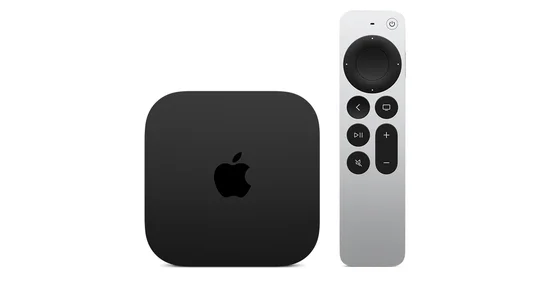
Start with the unit you actually use
A television in the living room and another in a bedroom might both offer Apple TV+. Only a separate compatible box or another eligible Apple device can use the tvOS installation route described here. On Apple TV and tvOS, start at Settings, then General and About. Read the model number on the Apple TV box or its About screen. Apple lists A2843 as the third-generation 4K model with Wi-Fi and Ethernet; A2737 is the Wi-Fi model. The Apple TV app on a smart television can show similar branding without giving you a tvOS App Store. If the television has a box plugged into HDMI, keep its remote beside the television remote until you can tell which Home button takes you to the intended launcher.
The guide uses Apple TV 4K with Siri Remote as one concrete point of reference. Apple lists two third-generation Apple TV 4K configurations, A2737 for Wi-Fi and A2843 for Wi-Fi with Ethernet. A replacement Siri Remote can be paired to another box, so the remote alone cannot settle which model is on the shelf. Check Settings, General and About against Apple’s model list. If the household expects a wired comparison, identify whether this model actually has an Ethernet port before changing the router or looking for an adapter. Compare the full product designation with the one on your own device. Similar appearance can be enough to find the right family while leaving the release year, operating-system generation or account requirements open.
Install and open an appropriate player
The usual distribution for this family is Apple TV App Store. Use the App Store on the Apple TV HD or Apple TV 4K. Search with the remote, inspect the developer and compatibility information, then choose the displayed price or Get. A television running the Apple TV streaming app has its own store and install rules. Look for the opening screen before asking anyone to issue service details. A successful installation answers the hardware and distribution question. The correct form for a viewing account becomes clear once the player presents its own choices.
For a practical check on Apple TV and tvOS, test a tvOS installation independently of AirPlay from an iPhone. A local failure and a failed wireless transfer need different details. Use the clickpad or directional ring to select a channel, open its guide, then return to the channel you started on. Keyboard input can make initial setup easy while hiding poor navigation on the sofa. Repeat the action with the remote, touchscreen or keyboard the household will normally use. Someone completing setup with a different controller may never see the problem that makes everyday viewing difficult.
Two nearby examples
Apple iPhone family illustrates a different decision. The iPhone product photograph identifies a family of phones. The App Store evaluates the installed iOS version and device compatibility instead of the model’s appearance. Play a channel through the phone’s own speakers, using the network you intend to test. Read the player name and version before opening an AirPlay destination. A phone connected to headphones can also send sound away from the speaker you expect. Match the visible symptom, screen and input device in that example with your own before carrying over its instructions.
Another useful comparison comes from Apple iPad Pro. The large-screen iPad Pro can be used on a desk or handheld. A keyboard, external monitor or split viewing arrangement adds input and display choices to a setup that begins on the tablet itself. Open the player at full size and use touch to select the guide. After that test, open the multitasking layout you normally use. Record the window size and orientation before deciding a missing guide button is a sign-in fault. If the image or platform mark resembles your own but its menus differ, record your exact model and system version. One manufacturer can sell machines with several operating systems, especially across markets and product generations.
From first launch to a useful support reply
Once the player opens on Apple TV and tvOS, identify the fields it actually offers. An Apple Account can authorize an app purchase. The viewing account is entered inside the installed player. Open its own start screen to find out whether it accepts a playlist address or separate account fields. A download on an iPhone does not establish eligibility on tvOS. A support request can describe the labels, the country and the product version while leaving values private. This gives the issuer enough context to choose the right registration or playlist format.
When you can see programmes in the Apple TV app but have no App Store icon, check which device generated that screen. Use the Siri Remote to open the attached Apple box’s Home screen and look there. When you ask about Apple TV and tvOS, give the last screen that worked and the precise action immediately after it. Mention a second screen only if you actually repeated the same test there. A working station on another device can distinguish a local app question from a question about one feed.
Find the player
Use the box’s App Store to find the exact player. Choose Get or the displayed price, then open it and note the kind of account it asks for.
The model detail that matters
A television with the Apple TV app is a different device from an Apple TV box. Use the store belonging to the hardware in front of you.
After the player opens
Look for the login method shown on screen. If it asks for a username and password, request details for that exact player. If it asks for a device key or portal, ask support to confirm the method privately.
Request a device trialIdentified models
Named hardware and model guides
Questions and answers
How do I choose a player for Apple TV?
The App Store is available on Apple TV HD and Apple TV 4K. A third-generation Apple TV has built-in apps and cannot add a new player from the store. Use the box’s App Store to find the exact player. Choose Get or the displayed price, then open it and note the kind of account it asks for.