Fire TV Stick 4K - 3rd Gen (2026) viewing setup
Fire TV Stick 4K - 3rd Gen (2026) identifies itself as AFTCR001 in Amazon’s device table. Its software family is Vega OS.
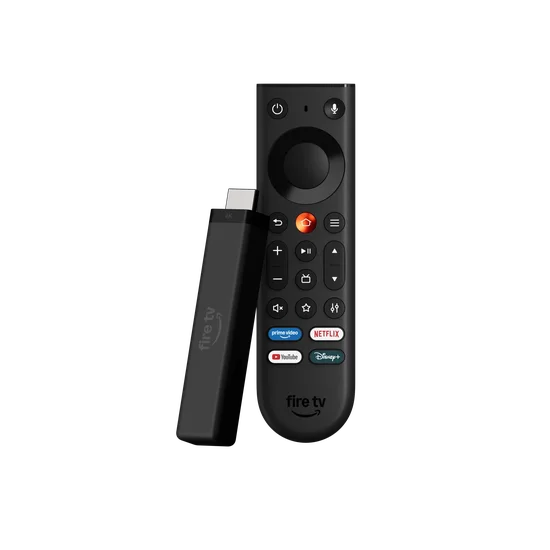
The new 4K Stick replaced an Android-based generation
A known Android package from the old 4K Stick cannot establish a migration path. Check the new Vega catalogue and ask whether the publisher has a release for this particular model before transferring a viewing subscription. Amazon places the 2026 third-generation 4K Stick in its Vega family. Look for a Vega-compatible store listing when choosing a player.
Amazon lists Fire TV Stick 4K - 3rd Gen (2026) with the identifier AFTCR001 and the system family Vega OS 2.0. Start in Settings on the Fire TV, then its device information and model name. Write down the model name and system version actually displayed. The manufacturer’s release specifications describe the hardware family, while the owner’s About screen tells the publisher which software is running today.
Read the hardware record
The specification lists stick hardware, 1GB of memory and 8 GB of nominal storage for AFTCR001. Memory and storage answer different questions. An installation that says it has run out of space concerns available storage. It does not follow that all the storage on the box is free just because the original specification quotes a capacity.
For comparison, Fire TV Stick 4K - 1st Gen (2018) carries the build model AFTMM and runs Fire OS 6. The 2018 4K Stick uses Android API level 25. The 2023 4K Stick uses a different operating-system generation and build model. When a recommendation mentions the other product, return to the model name before interpreting the app’s minimum requirements. Names on shop receipts can omit a generation or shorten a label even when they describe different releases.
Choose a player for this release
Fire TV Stick 4K - 3rd Gen (2026) belongs to Vega OS 2.0. The two Android packages examined in the installer directory describe Android API levels and native Android code. Those measurements cannot establish a Vega release. Ask the publisher for the exact title offered in the on-device Vega store, and inspect the listing on this stick.
Use Amazon Appstore for a Vega Fire TV on the AFTCR001 device while the intended Amazon profile is active. Search the Amazon store from the Vega device itself. If the publisher names an Android APK, ask for its Vega availability and the exact Amazon listing. A publisher may offer the same brand on both systems through different releases. If you already have an installed app, note whether its own information screen gives a version. A listing visible on a computer or on another Amazon device does not settle the catalogue available to this one.
Separate launch, account and playback
After a supported app opens on Fire TV Stick 4K - 3rd Gen (2026), note the first screen you can actually operate. A store result and a viewing entitlement answer two separate questions. Open the supported Vega player and identify its allowed login method before asking support to issue anything. Leaving that field visible makes a much better support request than a photograph of the Amazon logo. If the player can reach a menu, pick one familiar station and use the ordinary remote to leave it and return. That short sequence checks input and navigation in the part of the app you will use most.
A useful second attempt on AFTCR001 keeps the player, account and network unchanged. Select another station in the same session. If both fail before a picture appears, capture the wording and time. If one works, give the provider the exact channel edition and the affected programme. An account change would discard the comparison you just established.
Tell support which generation you have
For Fire TV Stick 4K - 3rd Gen (2026), include “AFTCR001, Vega OS 2.0” and the app title in the first message. Look for an explicitly targeted Vega build and have support match the account to its actual start screen. Say separately whether the publisher listing was missing, the download failed or an installed app opened but stopped at login. Each happens at a different stage and can require a different contact.
Keep the comparison with Fire TV Stick 4K - 1st Gen (2018) in the conversation only if it is the other device you actually tried. A report from someone else’s room can help explain why you expected a feature, but the name, market and observations from your own AFTCR001 device give the publisher a firmer starting point.
Identify the hardware
| Detail | What to match |
|---|---|
| Product pictured | Fire TV Stick 4K - 3rd Gen (2026) |
| Device family | Amazon Fire TV |
| Amazon build model | AFTCR001 |
| Operating system | Vega OS |
Choose the player
Amazon places the 2026 third-generation 4K Stick in its Vega family. Look for a Vega-compatible store listing when choosing a player.
Open the Amazon Fire TV guideQuestions and answers
Which Amazon identifier applies to Fire TV Stick 4K - 3rd Gen (2026)?
Amazon lists AFTCR001 and Vega OS 2.0. Amazon places the 2026 third-generation 4K Stick in its Vega family. Look for a Vega-compatible store listing when choosing a player.
Illustrated guides