Fire TV Stick - 1st Gen (2014) viewing setup
Fire TV Stick - 1st Gen (2014) identifies itself as AFTM in Amazon’s device table. Its software family is Fire OS 5.
An original Stick still boots but its player has disappeared
Search the current Fire TV catalogue on the original stick. Newer minimum system requirements can leave an old installation and a new store search in different states. Preserve the old app long enough to record its name and version. Amazon records Android API level 22 for the original Stick. Check continued player availability for that level before buying access for this device.
Amazon lists Fire TV Stick - 1st Gen (2014) with the identifier AFTM and the system family Fire OS 5. Start in Settings, then My Fire TV or Device & Software, followed by About. Write down the model name and system version actually displayed. The manufacturer’s release specifications describe the hardware family, while the owner’s About screen tells the publisher which software is running today.
Do the first network check without an Ethernet adapter
AFTM is the original 2014 Fire TV Stick. Amazon specifies a Broadcom Capri 28155 processor, 1 GB of RAM and Wi-Fi using 802.11a/b/g/n. Its hardware table lists Ethernet as unsupported. Advice to plug in the adapter used by a newer stick can therefore send an owner looking for an installation path this model never offered.
Use the stick’s existing wireless connection to open its normal store. If an app listing will not load, verify that you are on the Fire interface and that the stick has joined the intended network. Seeing a picture over HDMI only proves the stick can display a screen. It leaves the wireless connection and store catalogue untested.
If the store opens but an older player is absent, keep the name and version of any installation already present. A newer release can demand a higher Android level than this stick provides. Ask the publisher about this model’s supported catalogue before erasing a local copy that might be impossible to restore.
Choose a player for this release
Fire TV Stick - 1st Gen (2014) maps to Android API 22 in Amazon’s device table. The archived Trex IBO manifest declares a floor of API 21, while Pro declares API 24. The Pro copy examined therefore requires a newer Android level. IBO passes that one numerical check, but only the publisher can confirm a current Fire-compatible release for this model.
Use Amazon Appstore on Fire TV on the AFTM device while the intended Amazon profile is active. Start in the Amazon store on the actual Fire TV. Look up the publisher’s named player and check whether Amazon offers it for this device. A mobile Android package that passes a minimum version check may still require a different processor, input system or distribution method. If you already have an installed app, note whether its own information screen gives a version. A listing visible on a computer or on another Amazon device does not settle the catalogue available to this one.
Separate launch, account and playback
After a supported app opens on Fire TV Stick - 1st Gen (2014), note the first screen you can actually operate. Opening the Fire TV launcher proves the stick or box has started. Opening a player brings you to its separate account screen. A Downloader lookup number may locate a file but cannot fill in a viewing account or provision a subscription. If the player can reach a menu, pick one familiar station and use the ordinary remote to leave it and return. That short sequence checks input and navigation in the part of the app you will use most.
A useful second attempt on AFTM keeps the player, account and network unchanged. Select another station in the same session. If both fail before a picture appears, capture the wording and time. If one works, give the provider the exact channel edition and the affected programme. An account change would discard the comparison you just established.
Tell support which generation you have
For Fire TV Stick - 1st Gen (2014), include “AFTM, Fire OS 5” and the app title in the first message. Start with Amazon’s store evidence, then compare Android package metadata only when support confirms a Fire OS release. Say separately whether the publisher listing was missing, the download failed or an installed app opened but stopped at login. Each happens at a different stage and can require a different contact.
Keep the comparison with Fire TV - 1st Gen (2014) in the conversation only if it is the other device you actually tried. A report from someone else’s room can help explain why you expected a feature, but the name, market and observations from your own AFTM device give the publisher a firmer starting point.
Identify the hardware
| Detail | What to match |
|---|---|
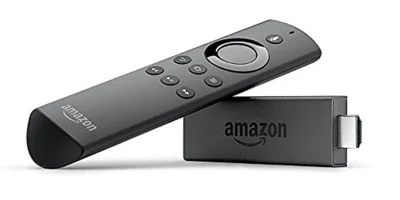
| Product pictured | Fire TV Stick - 1st Gen (2014) |
| Device family | Amazon Fire TV |
| Amazon build model | AFTM |
| Operating system | Fire OS 5 |
Choose the player
Amazon records Android API level 22 for the original Stick. Check continued player availability for that level before buying access for this device.
Open the Amazon Fire TV guideQuestions and answers
Which Amazon identifier applies to Fire TV Stick - 1st Gen (2014)?
Amazon lists AFTM and Fire OS 5. Amazon records Android API level 22 for the original Stick. Check continued player availability for that level before buying access for this device.
Illustrated guides