Apple iPad family lineup viewing setup
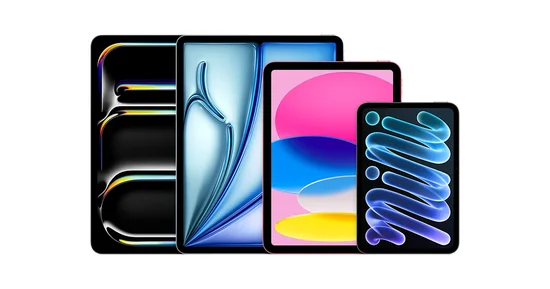
The photograph identifies Apple iPad family lineup. Match the full product name and the device that runs the app before choosing an installer.
Recognize the hardware
A photograph of the iPad family shows several tablets. The user’s own model name and iPadOS version carry more weight than a comparison of bezels in a product photograph. A collection photo identifies the family only. Use the model in Settings for a purchase or a compatibility enquiry.
To check the player on Apple iPad family lineup, begin at Settings, General and About on the iPad. Read the iPad model and iPadOS version in About. Two iPads can share a family name and use different software. The supported-device list and the screen layout on the iPad listing are better evidence than a photograph of a similarly sized tablet. Record the installed version while the screen is in front of you. A shop description can name the product family without telling you what software this particular unit runs.
Find the correct installation route
For Apple iPad family lineup, the first distribution check concerns the iPad App Store. Choose the app from the App Store on the iPad and inspect its compatibility details and any in-app purchases. If the owner uses a keyboard or an external screen, complete initial setup on the iPad display first. Open the player before arranging trial access. Before accepting a purchase, read the name of the organization charging for it. An application licence, an optional upgrade and a viewing account can have different issuers even when all three appear during one setup.
When Apple iPad family lineup reaches the account screen, record the labels before asking for a trial. A provider’s login form appears after installation. Type into the fields the player actually displays. The App Store purchase account, an app licence and a viewing subscription can be managed by different organizations even when they appear in the same afternoon’s setup. If the approved player opens with an existing profile, leave it available until you have identified the profile used for the test. A new installation can remove the most helpful point of comparison.
Compare the next device in the room
A useful comparison here is Apple iPad Pro. The large-screen iPad Pro can be used on a desk or handheld. A keyboard, external monitor or split viewing arrangement adds input and display choices to a setup that begins on the tablet itself. Open the player at full size and use touch to select the guide. After that test, open the multitasking layout you normally use. Record the window size and orientation before deciding a missing guide button is a sign-in fault.
The observation to carry over from the comparison is specific to Apple iPad family lineup. Compare the app in the actual iPad viewing mode and keep the tablet model distinct from the account that purchased it. If the two devices behave differently, record the service you selected, the displayed local time and which player opened it. A new app, a new network and a new account in the same attempt leave several possible explanations.
When the first attempt stalls
An installation question about Apple iPad family lineup can begin with the last screen that worked. If the iPad displays an image but a connected monitor does not, return to its built-in screen. When the built-in display works, record the monitor, adapter or AirPlay route. Resetting the viewing account would change another variable before testing the display path. Describe the change you made once, then try the same action again. Keep an existing working connection or account intact while checking the one that fails.
A concise message can include “What should a shared household tablet verify?” followed by the model, system version, player title and what you saw. Give the first result from the test above as well. Those details are enough to start a conversation without sending a password, a private playlist or a photograph of someone else’s account.
Identify the hardware
| Detail | What to match |
|---|---|
| Product pictured | Apple iPad family lineup |
| Device family | iPhone and iPad |
| Other catalogue labels | Apple, iPad family; multiple models, iPad |
Choose the player
Search the exact player and publisher name. Read the purchase and compatibility information, then open the app and identify the login method.
Open the iPhone and iPad guideAn iPad family photograph cannot supply an operating-system version
The pictured lineup helps a viewer recognize an iPad, but several generations can receive different system releases. Read the actual model name and installed iPadOS in Settings. Then open the particular app’s store page on that iPad and check its compatibility. A family photo beside a tutorial cannot supply either of those details.
In a shared home, check whose App Store purchase history contains an older player before treating the cloud download symbol as entitlement to the viewing service. A previous installation can be associated with a store account while the service login was issued by someone else. Keep those two records distinct when describing a purchase or a missing profile.
Questions and answers
Illustrated guides