
STRONG LEAP LIVE 420 with remote player setup
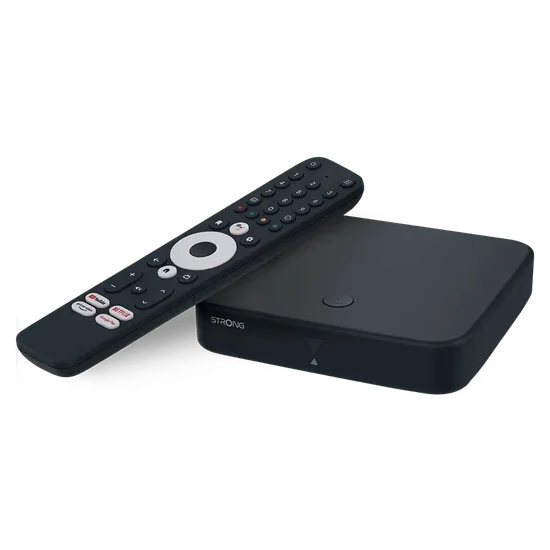
STRONG lists the SRT 420 as an Android TV 11 box with a DVB-T2 terrestrial tuner. Its retail name LEAP LIVE 420 can therefore refer to a device handling two genuinely different ways to receive television.
Recognize the hardware
STRONG lists the SRT 420 as an Android TV 11 box with a DVB-T2 terrestrial tuner. Its retail name LEAP LIVE 420 can therefore refer to a device handling two genuinely different ways to receive television. The integrated terrestrial tuner is a reason to identify the source route before treating every programme on the LEAP as internet television.
To check the player on STRONG LEAP LIVE 420 with remote, begin at the device settings and the About or System information screen. An Android television app needs to work with a remote and from a sofa. The Play catalogue that appears for a handset can contain software the television cannot install. Use the brand, model and installed Android TV release to identify the target device. Record the installed version while the screen is in front of you. A shop description can name the product family without telling you what software this particular unit runs.
Was the broadcast tuned from an antenna or opened in an app?
Start one antenna channel through the receiver’s tuner if available, then return to the Android TV interface for the viewing player. Identify which route a saved channel belongs to. A tuner scan and an online playlist are maintained separately. Move between two nonadjacent channel groups with the remote. Select a station, return, then reopen its group. This quick trip reveals an awkward phone-only interface before an activation or long subscription disguises the actual problem.
If antenna television works but the player cannot load a network group, record that contrast and the network status. If the app works and the terrestrial channel is absent, the relevant checks concern the antenna and tuner. Keep the outcome with the device name, STRONG LEAP LIVE 420 with remote. If a message appears, write down its wording and the action immediately before it. Someone reading that description can repeat the same step without guessing whether the failure happened at the store, in the player or during playback.
Find the correct installation route
For STRONG LEAP LIVE 420 with remote, the first distribution check concerns Google Play for Android TV. Open Apps on the Android TV home screen, launch Google Play where offered, and search the exact player. Check the TV in the device selector if looking at Google Play elsewhere. Read the listing on the television before confirming a purchase. Before accepting a purchase, read the name of the organization charging for it. An application licence, an optional upgrade and a viewing account can have different issuers even when all three appear during one setup.
When STRONG LEAP LIVE 420 with remote reaches the account screen, record the labels before asking for a trial. Once the app opens, look at the first form. A playlist link normally belongs in one address field. An account screen can ask for multiple values. Ask which one was issued before copying part of a playlist into an unrelated box. If the approved player opens with an existing profile, leave it available until you have identified the profile used for the test. A new installation can remove the most helpful point of comparison.
Compare the next device in the room
A useful comparison here is Google TV Streamer (4K). Google describes the standalone Google TV Streamer as a 4K product with Android TV OS and a dedicated Ethernet port. This is a separate device from an older Chromecast receiver that depends on a phone for a particular session. Open the Streamer’s own Home screen and locate the app using its remote. Start playback there and put the phone aside. That confirms whether the experience uses an installed television app before testing a separate send-to-TV workflow.
The observation to carry over from the comparison is specific to STRONG LEAP LIVE 420 with remote. Use a compatible TV edition for remote navigation. A promising phone screenshot gives little evidence about the living-room layout. If the two devices behave differently, record the service you selected, the displayed local time and which player opened it. A new app, a new network and a new account in the same attempt leave several possible explanations.
When the first attempt stalls
An installation question about STRONG LEAP LIVE 420 with remote can begin with the last screen that worked. When a result appears on Android mobile but the television cannot see it, keep both search results. Compare the target-device compatibility and publisher before trying another player. Reinstalling a working television store rarely tells you why one listing is missing. Describe the change you made once, then try the same action again. Keep an existing working connection or account intact while checking the one that fails.
A concise message can include “Was the broadcast tuned from an antenna or opened in an app?” followed by the model, system version, player title and what you saw. Give the first result from the test above as well. Those details are enough to start a conversation without sending a password, a private playlist or a photograph of someone else’s account.
Questions and answers
Was the broadcast tuned from an antenna or opened in an app? (STRONG LEAP LIVE 420 with remote)
Start one antenna channel through the receiver’s tuner if available, then return to the Android TV interface for the viewing player. Identify which route a saved channel belongs to. A tuner scan and an online playlist are maintained separately.