
Samsung Galaxy S25 Ultra player setup
A Galaxy S25 Ultra is an Android handset. Its Samsung branding does not give it the Tizen app store installed on some Samsung televisions.
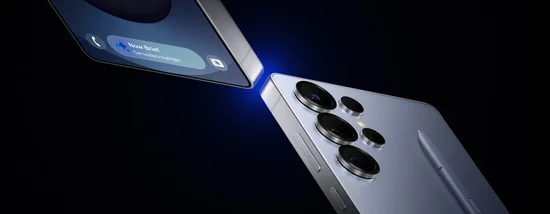
Recognize the hardware
A Galaxy S25 Ultra is an Android handset. Its Samsung branding does not give it the Tizen app store installed on some Samsung televisions. A Galaxy tablet shares the mobile ecosystem but can expose a different layout from a phone or a Tizen television.
To check the player on Samsung Galaxy S25 Ultra, begin at Settings, then About phone or About tablet, followed by Android version. The device’s retail name and its installed Android release are separate pieces of information. A maker’s interface or software version can also be displayed in About. Write down Android version itself, especially after restoring a phone or inheriting an older tablet. Record the installed version while the screen is in front of you. A shop description can name the product family without telling you what software this particular unit runs.
Which Samsung device is hosting the player?
Use the Galaxy’s app listing for a mobile setup, and check the installed Android release. If the intention is casting, establish a locally playing channel before choosing a TV. If the intention is to install on the TV, set the phone aside and identify the TV’s model. Try the app on the phone’s own screen with familiar earphones or speakers. Keep the first test on one network. Once that works you can run a separate casting or mobile-data test and record which part changes.
If a household already paid for a Samsung television app, keep its receipt and publisher name while checking handset support. A similarly named mobile app may have separate purchase conditions and account fields. Keep the outcome with the device name, Samsung Galaxy S25 Ultra. If a message appears, write down its wording and the action immediately before it. Someone reading that description can repeat the same step without guessing whether the failure happened at the store, in the player or during playback.
Find the correct installation route
For Samsung Galaxy S25 Ultra, the first distribution check concerns Google Play on the handset. Use Google Play on a device that has the store. Search the full player name, examine its publisher, and read the device-compatibility information. The same Google account can have a phone and a television attached with different installation choices. Before accepting a purchase, read the name of the organization charging for it. An application licence, an optional upgrade and a viewing account can have different issuers even when all three appear during one setup.
When Samsung Galaxy S25 Ultra reaches the account screen, record the labels before asking for a trial. Open the installed mobile player before requesting an account. A touch interface may offer a playlist address, a provider picker or separate account fields. Only the service that issued your account can confirm which form should receive the information. If the approved player opens with an existing profile, leave it available until you have identified the profile used for the test. A new installation can remove the most helpful point of comparison.
Compare the next device in the room
A useful comparison here is Samsung Galaxy Tab S10 series. The product image identifies the Galaxy Tab S10 series. The individual tablet model and Android release are more precise than the series photograph for a compatibility enquiry. Play on the built-in display, rotate from portrait to landscape and reopen the programme guide with touch. Check whether the selected group and guide time survive. A player designed for a phone can reveal its limits on a larger screen during this small test.
The observation to carry over from the comparison is specific to Samsung Galaxy S25 Ultra. Keep the handset app, its cast receiver and the viewing account separate when describing a failure. If the two devices behave differently, record the service you selected, the displayed local time and which player opened it. A new app, a new network and a new account in the same attempt leave several possible explanations.
When the first attempt stalls
An installation question about Samsung Galaxy S25 Ultra can begin with the last screen that worked. If the phone returns to the store, look for Open or Update and check the publisher name again. If it opens but no service appears, preserve the app and check the type of account you were given. These two failures start in different places. Describe the change you made once, then try the same action again. Keep an existing working connection or account intact while checking the one that fails.
A concise message can include “Which Samsung device is hosting the player?” followed by the model, system version, player title and what you saw. Give the first result from the test above as well. Those details are enough to start a conversation without sending a password, a private playlist or a photograph of someone else’s account.
Separate a handset test from the television across the room
A programme playing on this Galaxy phone does not establish that the Samsung television’s own Tizen store offers the same player. Identify whether a phone was driving the television when a problem occurred. If an app never opened on the television itself, describe the phone and wireless or cable route in the support message.
On the handset, compare a short session in the foreground with the same programme after the display has been locked and reopened. Write down whether playback resumes, begins again or returns to a sign-in screen. Include the installed application version and Android release so the publisher can investigate that particular return-to-app sequence.
Questions and answers
Which Samsung device is hosting the player? (Samsung Galaxy S25 Ultra)
Use the Galaxy’s app listing for a mobile setup, and check the installed Android release. If the intention is casting, establish a locally playing channel before choosing a TV. If the intention is to install on the TV, set the phone aside and identify the TV’s model.