
Daytona 500 viewing guide
The Daytona 500 and the 24-hour sports-car race use the same speedway in different configurations. Use the NASCAR Cup race title and race date before comparing footage.
The white flag and the final caution at Daytona
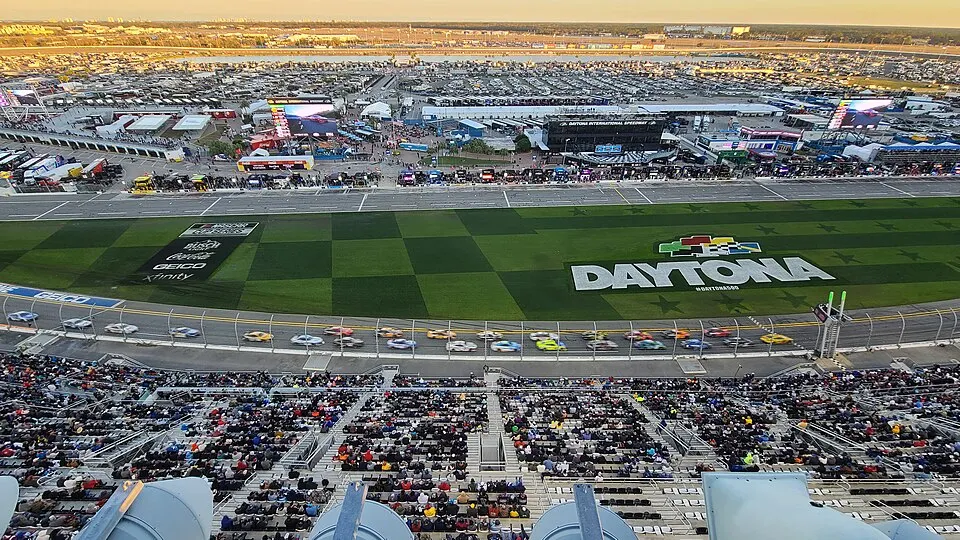
William Byron’s 2024 Daytona 500 finish turns on two signals arriving close together. NASCAR’s race report starts the final scramble with a restart on lap 197 of the scheduled 200. Byron reached the line to take the white flag just before a caution was called as Ross Chastain slid through the infield grass. Byron won, with Hendrick Motorsports teammate Alex Bowman second. Stopping the replay at the sight of a spinning car can leave the viewer unsure where the leader was when the caution came out.
Begin at that late restart and watch both the front of the pack and the flag signal. The last few seconds make more sense with the positions established several laps earlier. The published report is dated Monday, 19 February. Searching solely under the Sunday normally associated with the Daytona 500 can overlook the right recording. Byron’s name, the 2024 edition and the lap-197 restart are the three most efficient details to give someone looking for this particular finish.
NASCAR · 2024 Daytona 500 race reportFrom the competition archive

The stock-car race at Daytona
The Daytona 500 and the 24-hour sports-car race use the same speedway in different configurations. Use the NASCAR Cup race title and race date before comparing footage.
For Daytona 500, keep the series, circuit, session and class where applicable on the same line when saving a fixture. Start with the circuit and session. A meeting can appear under a city, a circuit sponsor or a championship round number. Practice, qualifying and the race are distinct entries. For a multiclass grid, a class result and the overall classification answer different questions about the same finish.
Reading the programme and the archive
The background record for Daytona 500 adds context to a programme listing. Among its identifying details are venue — Daytona International Speedway, surface — Asphalt. Take the edition year from the actual results when looking for archive footage. A present-day description can name a venue, format or governing body that was different when the footage was recorded. Compare the title on screen with the description in the competition background.
Daytona 500 schedules can attach more than one time to the same programme. The venue timetable may list a pit-lane opening, a formation lap or the start of timed competition. A broadcaster can add a grid walk before any of them. Save the organizer’s session name with the time so a search for the round does not land on an earlier session.
What a host-city time means at home
Consider a clock example for a viewer following Daytona 500. Imagine that a programme lists 19:30 in Daytona Beach on 12 December 2026. That reads 00:30 on 13 December in London and 09:30 on 13 December in Tokyo. The example is a time conversion. A real fixture still needs its own published start and host city.
Using the same 19:30 in Daytona Beach on 12 June 2027 gives 00:30 on 13 June in London and 08:30 on 13 June in Tokyo. Compare those two dates before carrying a time difference into another Daytona 500 round. If the scheduling app already displays your local time, save the entry as shown. Converting it again is how an otherwise correct reminder ends up an hour or a whole day out.
Who carries the event in your market?
Begin with the organizer’s event page for Daytona 500 and choose the event, edition or fixture. Follow a “where to watch” link for the country in which the screen will be used. In the local broadcaster’s own guide, match the event details with the network or streaming service and the start of coverage. A worldwide organizer feed and a domestic broadcaster may use different names for the same programme.
Finding the part you came for
For an archive search under Daytona 500, start with the official results before typing a long description of a moment. A race summary, a full world-feed replay and an onboard camera can show different parts of the same incident. Look for the lap or elapsed race time on the official timing sheet. Circuit names can survive changes in layout, so include the season.
Competition picture desk
One documented edition
A dated example is 2024 Daytona 500. The published date or season is February 19, 2024. The edition profile identifies Daytona International Speedway in Daytona Beach, Florida in its venue or host information. Its entry for distance reads 200 laps, 500 mi (800 km). Use those details when comparing a film of Daytona 500 with an organizer’s newer season page. An upload date can be years after the competition, while the venue or edition on the original graphic ties the footage to its sporting record.
The Sunday programme that became a Monday race
NASCAR's report of the 2024 Daytona 500 records a rain postponement from Sunday to Monday and William Byron's victory after a late restart. That shift matters to anyone looking through a personal recording or an old electronic programme guide. The original Sunday slot can contain weather coverage without a complete race. Search the Monday race and use the restart on lap 197 of the scheduled 200 as a marker for the closing sequence. The run to the white flag and the caution seen immediately afterwards are closer clues than a generic reference to a last-lap finish.
Competition records and edition names
For an edition search, the competition profile for Daytona 500 records playing surface (Asphalt) and location (Daytona Beach, Florida, United States). Those are useful identifiers when an old television caption uses a different name or a translation. For a specific fixture, resolve the actual season first. Club membership, rules and venues in a general profile can reflect a later edition than the game in the archive.
Questions and answers
Which schedule details identify Daytona 500?
The Daytona 500 and the 24-hour sports-car race use the same speedway in different configurations. Use the NASCAR Cup race title and race date before comparing footage.