
Which WeatherSpy is in your programme guide?
The directory has 6 separate records carrying the name WeatherSpy across 6 source markets, including Australia, Brazil, Canada, India. A search by the display name alone can return the wrong broadcaster.
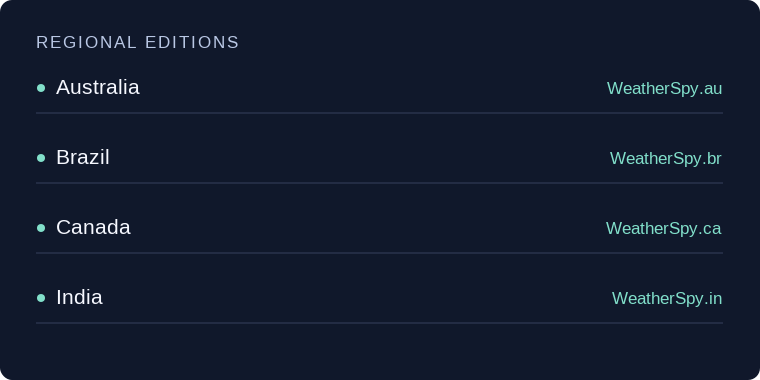
The editions side by side
Which entry matches your screen?
Use the source market and the station ID to tell these WeatherSpy entries apart before checking the programme at your local time.
Source edition dated 1 November 2026. Historical station records identify names and relationships. They do not describe a TREX account’s current channel lineup.
How to separate the results on one screen
Start with the country in which the station is listed. The spelling WeatherSpy occurs across 6 markets in this comparison. In Australia use WeatherSpy.au. In Brazil use WeatherSpy.br. The first row has no recorded alternative to WeatherSpy. For Brazil, the full identifier WeatherSpy.br is a better second search than guessing a translation. The country attached to a station describes where the record is filed, not which subscriptions include a stream in somebody else’s household.
Does a second name settle it? Of the 6 station rows grouped here, 0 include at least one alternate spelling. Comparing those spellings without regard to letter case gives 0 distinct aliases. For 6 entries, the display name is the only spelling supplied. With two search results on screen, keep the identifier containing the source market and the programme you expected. A logo shared across language editions may supply less information than either of those details.
Reading the entries for WeatherSpy and WeatherSpy
Put WeatherSpy beside WeatherSpy. The WeatherSpy record here belongs to Australia. The comparison entry for WeatherSpy belongs to United States. The most dependable discriminator in these rows is the pair of station IDs, WeatherSpy.au and WeatherSpy.us. If a guide abbreviates a name, copy the complete identifier for the result you want before comparing any programmes. Matching these identity fields gets you to the right record even when the player sorts the results differently.
To see where this article’s selection ends, compare WeatherSpy with 10 TV in India. The latter sits outside the group of 6 station records examined above. Its launch is dated 16 March 2013. There are 0 other local records under the weather category beyond this article’s membership. Finding a station in the same country or category therefore answers a different question from establishing the particular relationship on this page.
The programmes behind the display name
WeatherSpy carries the weather classification in the station file. The same search can also suggest WeatherSpy, which shares a category with WeatherSpy. A general-service schedule can put a bulletin, a match and a film on the same station in one evening. The category on a channel directory describes a broad service rather than any individual programme. For WeatherSpy, start with the broadcast itself. Write down one programme title and the next item shown in the guide. Two consecutive titles can distinguish a local edition when a cropped logo cannot.
Typing WeatherSpy into a guide can lead to more than one entry. This edition carries the identifier WeatherSpy.us. The catalogue also uses the name for WeatherSpy.au in Australia. A player’s search screen can shorten both to identical text. Open the programme details and compare the market field before adding either result to favourites. Keeping both identifiers beside a screenshot makes the mix-up much easier to explain.
An example across the two guide clocks
Suppose two guide entries are due at 20:30 UTC on 15 December 2026. For WeatherSpy, reading that instant on the clock in Lord Howe gives 07:30 on 16 December. For WeatherSpy, the clock in New York gives 15:30 on 15 December. This is a worked conversion, not a published start time for either broadcaster. Look for the city or time-zone label on a saved listing before assigning it to one of those dates.
One way to widen a search for WeatherSpy is through its recorded owner, Trusted Media Brands Inc.. The snapshot attaches that spelling to 5 station records, including At Home with Family Handyman, FailArmy, and People Are Awesome. Of those records, 5 carry United States as their source market. That makes the company label useful for tracing related names. For a viewing enquiry, return to the particular service and episode. A company’s name can lead to schedules from several stations.
What other records can establish about WeatherSpy
Consider what survives if you have an old schedule with a station name and a year but no logo. Across the records behind this WeatherSpy article, 0 of the 6 rows have a launch date, 0 have an alternate name, and 0 supply both. For a row such as WeatherSpy.au, keep the displayed station name and country together if one of those fields is unavailable. Two points of agreement let you investigate an identity more closely. Missing data in one field is an invitation to consult the original schedule.
There is no direct replacement link between any two of the 6 rows in this particular group. The shared subject of WeatherSpy is not evidence that WeatherSpy handed its schedule to WeatherSpy. If a newspaper or recording supplies another spelling, retain the original words and their date beside your modern lookup. That keeps the contemporary evidence visible if a catalogue entry changes later.
The November edition records 6 station website fields in the records behind this WeatherSpy article. A site attached to a station can help find a primary programme listing. Its presence does not date a schedule change, and an owner group may use one address for several different channels. When quoting WeatherSpy, retain the precise programme page or printed listing you actually checked.