
Which ESPN 2 is in your programme guide?
The directory has 3 separate records carrying the name ESPN 2 across 3 source markets, including United States, Australia, Netherlands. A search by the display name alone can return the wrong broadcaster.
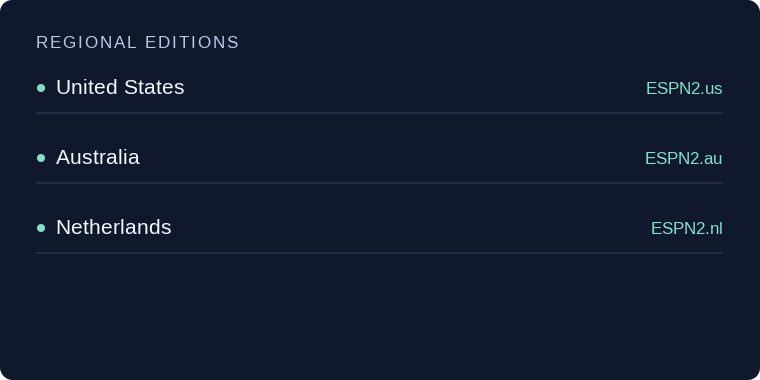
The editions side by side
| Station | Market | Name also recorded | Catalogue ID |
|---|---|---|---|
| ESPN 2 | United States | — | ESPN2.us |
| ESPN2 | Australia | — | ESPN2.au |
| ESPN 2 | Netherlands | — | ESPN2.nl |
Which entry matches your screen?
The dated entries include ESPN 2 (1 October 1993, United States), ESPN2 (1 March 2011, Australia). Use the source market and the station ID to tell these ESPN 2 entries apart before checking the programme at your local time.
Source edition dated 1 November 2026. Historical station records identify names and relationships. They do not describe a TREX account’s current channel lineup.
A channel can play while its listing is wrong
The channel list, the programme data and the player’s saved favourite can each carry a display name. That allows a service such as ESPN 2 to play normally even when its guide row comes from somewhere else. In this directory the identity is ESPN2.us. The comparison row uses ESPN2.nl. Treat those as documentation references, because a guide publisher may choose different identifiers for its own data.
First open ESPN 2 from the complete channel list. Read the current programme line and the one that follows. Now open the old favourite without editing it. If the picture is the same but the grid differs, note both routes and titles. If one route opens ESPN 2 instead, the favourite itself may refer to a different service. These outcomes point to different repairs.
Keep the two results private until you have cropped account and device information from any screen captures. The important part for a guide editor is which label supplied the picture and which supplied the programme row. A clean station example from United States gives them something they can reproduce without seeing your private account link.
How to separate the results on one screen
Start with the country in which the station is listed. The spelling ESPN 2 occurs across 3 markets in this comparison. In United States use ESPN2.us. In Australia use ESPN2.au. The first row has no recorded alternative to ESPN 2. For Australia, the full identifier ESPN2.au is a better second search than guessing a translation. The country attached to a station describes where the record is filed, not which subscriptions include a stream in somebody else’s household.
Does a second name settle it? Of the 3 station rows grouped here, 0 include at least one alternate spelling. Comparing those spellings without regard to letter case gives 0 distinct aliases. For 3 entries, the display name is the only spelling supplied. With two search results on screen, keep the identifier containing the source market and the programme you expected. A logo shared across language editions may supply less information than either of those details.
The programmes behind the display name
ESPN 2 carries the sports classification in the station file. The same search can also suggest ESPN 2, which shares a category with ESPN 2. A fixture can appear under a studio preview, the live event and an evening highlights show. Search results often shorten all three to the names of the teams. For ESPN 2, start with the broadcast itself. Keep the competition, opponents and expected start of play together. Compare those details with the broadcaster’s coverage start before deciding that a guide runs early.
Typing ESPN 2 into a guide can lead to more than one entry. This edition carries the identifier ESPN2.nl. The catalogue also uses the name for ESPN2.us in United States. A player’s search screen can shorten both to identical text. Open the programme details and compare the market field before adding either result to favourites. Keeping both identifiers beside a screenshot makes the mix-up much easier to explain.
An example across the two guide clocks
Suppose two guide entries are due at 20:30 UTC on 15 December 2026. For ESPN 2, reading that instant on the clock in New York gives 15:30 on 15 December. For ESPN 2, the clock in Amsterdam gives 21:30 on 15 December. This is a worked conversion, not a published start time for either broadcaster. Look for the city or time-zone label on a saved listing before assigning it to one of those dates.
One way to widen a search for ESPN 2 is through its recorded owner, Eredivisie Media & Marketing CV. The snapshot attaches that spelling to 6 station records, including ESPN, ESPN 3, and ESPN 4. Of those records, 6 carry Netherlands as their source market. That makes the company label useful for tracing related names. For a viewing enquiry, return to the particular service and episode. A company’s name can lead to schedules from several stations.
What other records can establish about ESPN 2
Consider what survives if you have an old schedule with a station name and a year but no logo. Across the records behind this ESPN 2 article, 2 of the 3 rows have a launch date, 0 have an alternate name, and 0 supply both. For a row such as ESPN2.us, keep the displayed station name and country together if one of those fields is unavailable. Two points of agreement let you investigate an identity more closely. Missing data in one field is an invitation to consult the original schedule.
There is no direct replacement link between any two of the 3 rows in this particular group. The shared subject of ESPN 2 is not evidence that ESPN 2 handed its schedule to ESPN 2. If a newspaper or recording supplies another spelling, retain the original words and their date beside your modern lookup. That keeps the contemporary evidence visible if a catalogue entry changes later.
The November edition records 3 station website fields in the records behind this ESPN 2 article. A site attached to a station can help find a primary programme listing. Its presence does not date a schedule change, and an owner group may use one address for several different channels. When quoting ESPN 2, retain the precise programme page or printed listing you actually checked.